アプリの動作を 書くだけ。dejavが テストします。

アプリで確かめたい動作を書いてください。 dejavがテストを作り、ブラウザで実行します。 操作ごとの画像とリプレイで、結果を確認できます。

1サイトまで無料。

使い方を見る
app.dejav.io
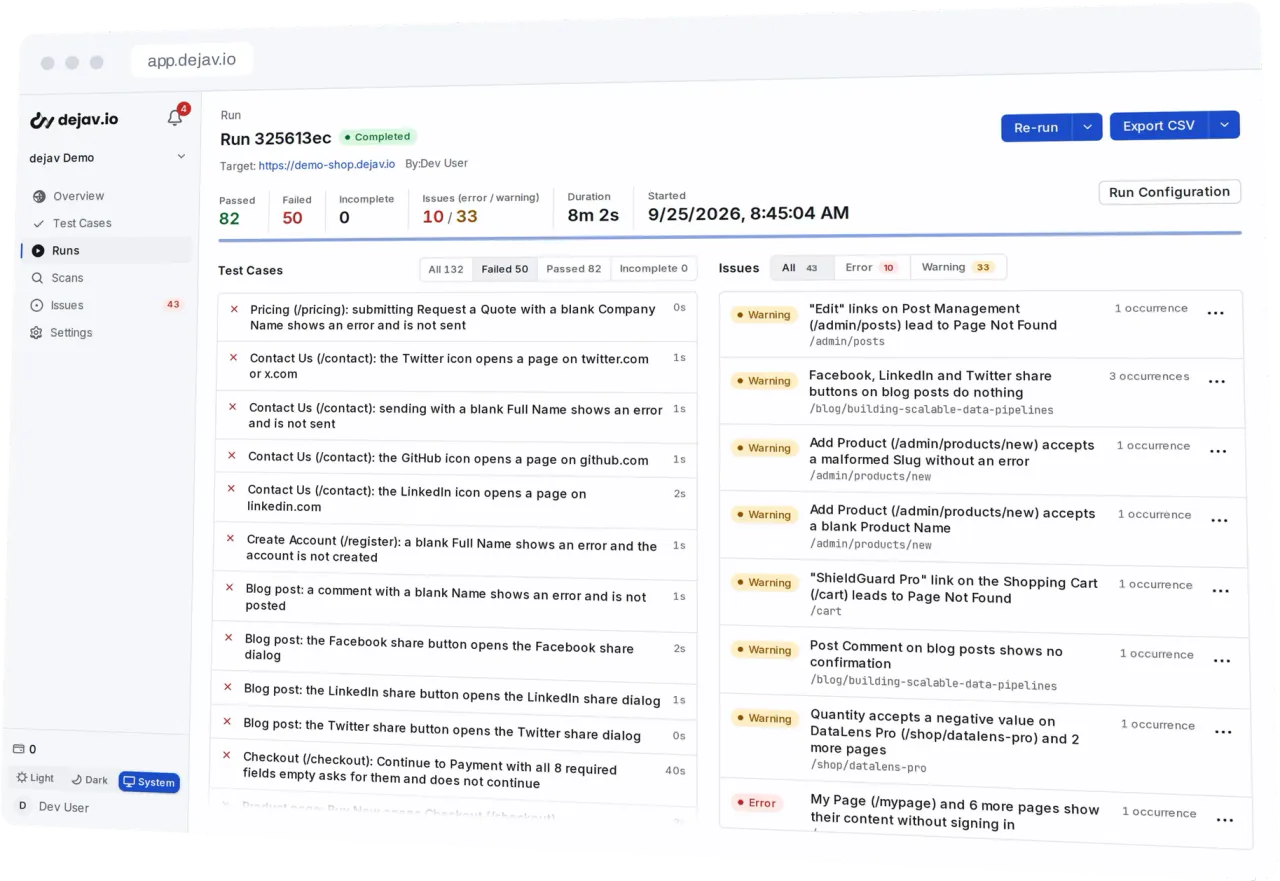
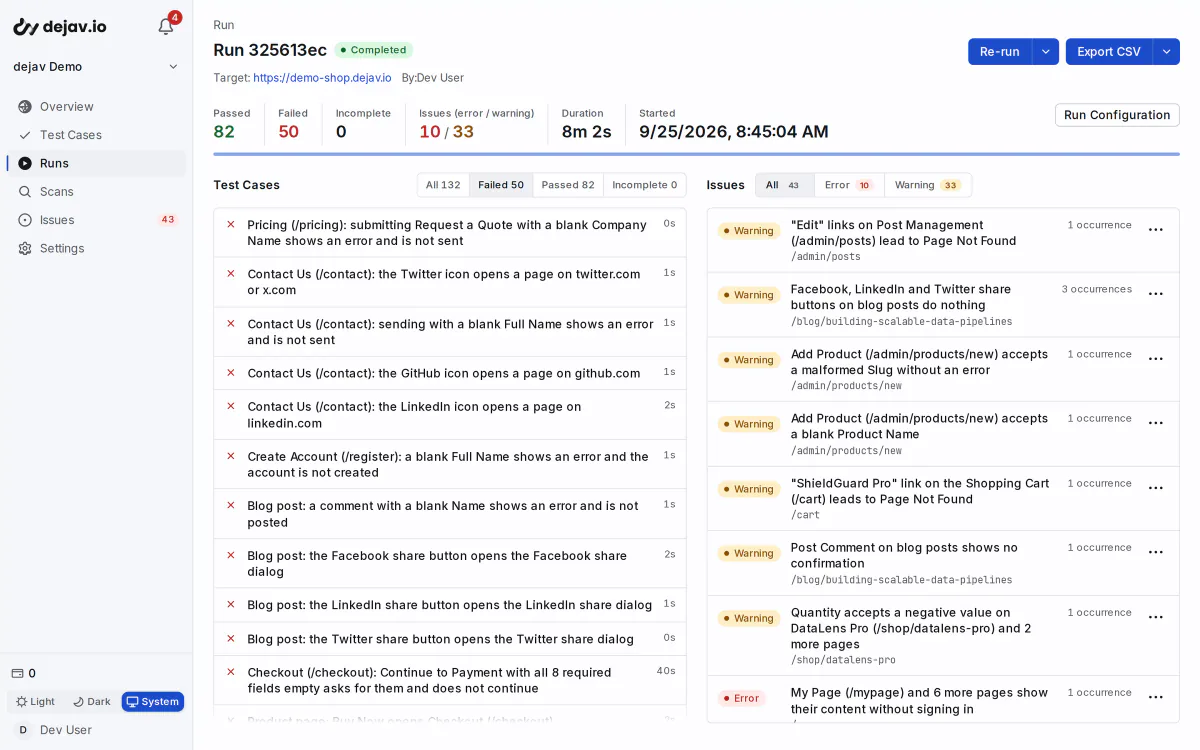
dejavの実行結果。合格・不合格の件数、テストケース、検出した問題を表示。

dejavの使い方

  1. 説明する

    アプリに期待する動作を貼り付けます。箇条書き、文章、スプレッドシートからコピーした行など、形式は問いません。

    DescriptionPasted

    Users can sign up with email and password

    Coupon SAVE10 takes 10% off the cart

    Stock decrements after a purchase

    Rows copied from a spreadsheet work too.

  2. 生成する

    dejavが説明と実際のページを照らし合わせ、テストケースを作成。記述されていない境界条件や不正な入力も対象にします。

    9 test cases from 3 linesGenerated

    From “Coupon SAVE10 takes 10% off the cart”

    • Coupon SAVE10 takes 10% off
    • Apply the same coupon twiceEdge
    • Apply a coupon to an empty cartEdge
    • Enter a malformed coupon codeError

    + 5 cases from the other 2 lines

  3. 実行する

    「実行」を選ぶだけ。必要な準備は自動で行い、結果とスクリーンショットを同じ実行画面に記録します。

    TC 4/9 · Coupon takes 10% off実行結果
    1. 1Open /cartpass
    2. 2Fill the coupon field with SAVE10pass
    3. 3The total is reduced by 10%pass

    Run passed

  4. 再実行する

    保存した手順を、追加クレジットなしで再実行できます。UIの変更でテストが失敗したら、内部で自動修復を試みます。

    Run #98 · Replay0 credits
    • Coupon SAVE10 takes 10% offpass
    • Apply the same coupon twicepass
    • Apply a coupon to an empty cartrepair attempted

    9 cases · 8 passed · 0 credits · 1 repair attempted

すべてのステップに、 結果と証跡を

各ステップの結果を、スクリーンショットとリプレイで確認できます。 失敗したときも、どの操作で何が起きたかを追えます。

ステップの結果
確認ごとの合格・不合格
スクリーンショット
操作対象を枠で表示
セッションリプレイ
操作全体を再生
run #142 · acme-store staging6 test cases · 5 passed · 1 failed
  • PASSSign up with a fresh email
  • PASSCheckout rejects an expired card
  • PASS[Edge] Double submit on the signup form
  • PASS[Error] SQL injection in search input
  • FAILCart total updates when quantity changes
  • PASSPassword reset email flow
TC 5/6 · cart total updates when quantity changesissue · functionality / error
  1. 1open /products/mugpass
  2. 2add to cartpass
  3. 3open /cartpass
  4. 4set quantity to 2pass
  5. 5expect total $168.00fail
  6. 6apply coupon SAVE10skipped
  7. 7checkout stays enabledskipped
replay · full session00:31 / 00:38 · failed at step 5

問題をGitHubに起票

ワンクリックでGitHubリポジトリにIssueを作成。 実行時の記録をもとに、dejavが内容を書きます。

タイトル
[カテゴリ/重要度] と問題のタイトル
ラベル
dejav、重要度、カテゴリ
スクリーンショット
GitHubのIssueに直接添付
重複
根本原因ごとに1件へ統合
The issue as it appears on GitHub after dejav files it.
github.com/acme/shop/issues/128

[visual/error] Menu opens under the hero on mobile #128

Openacme-qa opened this issue from dejav

acme-qa commented

Bug Report (dejav)

Category: visualSeverity: errorPage: /pricingRun: 7c1e04b2-9d3f-4a61-b8e0-52c4f1a7d690 / Runner 1First seen: 2026-09-24T09:12:40.318ZOccurrences: 3

Description

The menu opens under the hero at 390x844, so its links cannot be tapped.

Screenshot

Found by dejav, autonomous web testing

Labels

  • dejav
  • severity:error
  • category:visual

保存したテストを、同じ操作で再実行

同じテストを繰り返し実行できます。準備や修復が不要な再実行では、追加クレジットを使いません。

One test case, 8 runsRun and run again
  1. Run 1First runCreditsprepared automatically
  2. Run 2Replay0 credits
  3. Run 3Replay0 credits
  4. Run 4Replay0 credits
  5. Run 5Replay0 creditsfailed: UI changed
  6. Run 6Run + repairCreditsrepaired automatically
  7. Run 7Replay0 credits
  8. Run 8Replay0 credits

First run

Choose Run. dejav prepares the test when needed and records the browser execution in the same run.

Replay

Runs that need no preparation or repair use no extra credits. Results and screenshots are recorded each time.

Run + repair

If a page change prevents an operation, dejav attempts a repair automatically. Expected results stay the same; successful repairs use credits.

境界条件や不正な入力もテスト

記述された機能ごとに、二重送信、データが空の状態、不正な形式の入力など、説明にないテストケースも作成します。

EdgeUnexpected use
  • Boundary values
  • Double submits
  • Going back mid-flow
  • Empty states
  • Repeated clicks
ErrorInvalid and hostile input
  • Invalid input
  • XSS and SQL injection
  • Access without signing in
  • Malformed URLs
  • Access beyond the user's role

その他の機能

仕様書を取り込み、ログイン後の画面をテスト。 結果をいつもの作業に活用できます。

ログイン後の画面もテスト。

お客様が実際に使う画面をテストできます。 テストプロファイルにログイン情報を保存し、スキャン時に選ぶだけです。

仕様書も、テストの材料に。

GitHubリポジトリのフォルダを接続すると、スキャンのたびにMarkdownファイルを読み込みます。

MCP・CLI連携

近日提供予定

Codex、Claude Code、ターミナルからテストの作成・実行・結果取得へ。 普段お使いのツールとの連携を予定しています。

GitHub PR連携

近日提供予定

プルリクエストごとのプレビュー環境を自動テストし、結果と証跡をGitHubに表示。 レビューの流れへの組み込みを予定しています。

使いやすい言語で結果を表示

テスト手順、失敗理由、問題の説明を、プロジェクトごとに英語または日本語で表示できます。

既存のテストを取り込み

CSV・TSVファイルからテストケースを取り込めます。

結果を持ち出す

テストケース、実行結果、問題をCSVファイルにエクスポートできます。

問題を整理

理由を付けて問題をクローズできます。 解決済みの不具合が再発した場合は、新しい問題として登録されます。

セキュリティ

セキュリティの詳細

実行環境の隔離
テストは実行ごとに隔離されたブラウザで行います。接続先は、テスト対象サイト、dejavが利用するサービス、内部ネットワークに制限します。
ドメイン所有権の確認
DNSレコードを追加してドメインの所有権を確認します。確認前は、1回のスキャンまたは実行につき最大30件のテストケースが対象です。
対象外パスの指定
管理画面や本番の決済ページなど、除外したパスへのリクエストをブラウザがブロックします。
プロンプトインジェクション
サイトの探索・テストケースの生成時に、プロンプトインジェクションを検査します。検出するとスキャンを停止し、そのドメインへの新しいスキャンと実行もブロックします。
データの保護
サイトの認証情報は暗号化して保存します。スクリーンショットとリプレイの記録はプロジェクトごとに無効化でき、記録済みデータは一括削除できます。

小さく始めて、テストを続ける。

最初の1サイトは無料。準備や修復が不要な再実行はプランに含まれます。

プランの詳細を比較

Free

$0期間制限なし

  • 1サイト
  • 登録時に300クレジット、その後は毎月50クレジット
  • 月10,000回の再実行
無料で始める

クレジットカード不要。

Starter

近日提供予定

$12/ 月

  • プロジェクト数の上限なし
  • 毎月1,000クレジット
  • 再実行の回数制限なし
Starterの詳細を見る

すべてのアカウントはFreeから始まります。

Webアプリのテストを、無料で始めよう

無料で始める
dejav — Webアプリの自動テスト · dejav